
Why SimplAI Builder?
The simplest, fastest, and most powerful way to build agents in minutes
Build by Chat
Describe what you need → get a complete AI agent automatically.
Visual Workflow Builder
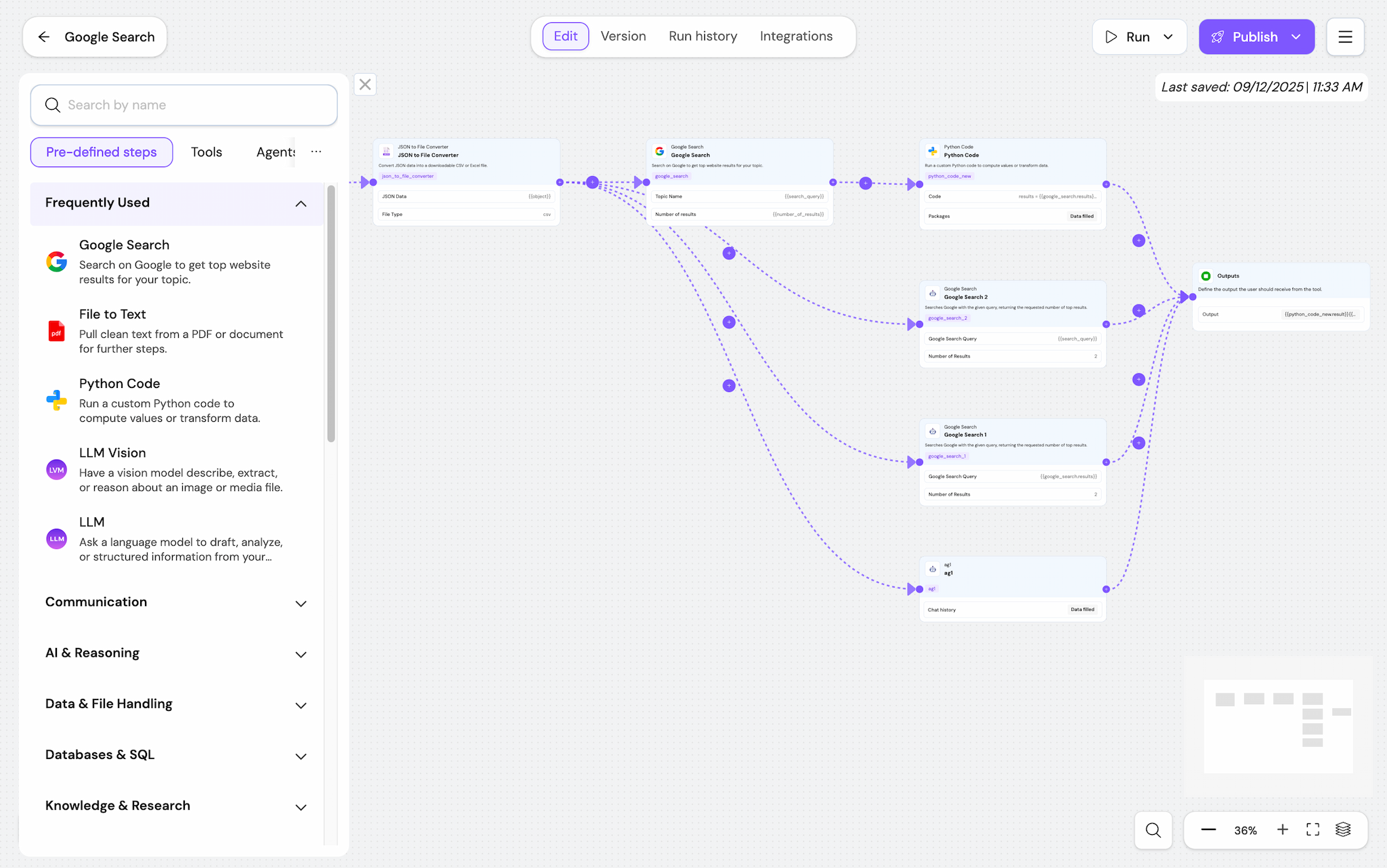
Design complex, multi-step logic with drag-and-drop ease.
100+ Ready Nodes
Add capabilities instantly - from LLMs to search, OCR, data extraction, and more.
MCP Connectivity
Bring your own tools, logic, and code - integrated directly into the Builder.
API, Webhooks & SDK
Deploy anywhere with one-click integration.
Version Control
Publish, rollback, compare versions - enterprise-grade control.
Builder + Assistant Combined
Experience the power of autonomous reasoning coupled with a visual builder.
Create Powerful AI Agents in Minutes
Simply describe what you want, and the SimplAI Assistant automatically understands your intent, builds the plan, and executes the workflow.
- Understands your intent & searches knowledge
- Generates a structured plan
- Chooses right steps, APIs, and integrations
- Delivers a production-ready AI agent instantly
Visual Workflow Builder
Designed for Speed & Clarity
A UX crafted for zero friction. Multi-agent logic ready, multi-step complex workflows, and easy integrations.
- Visual drag-and-drop builder
- Fast, clean, modern UI
- Enterprise-scale orchestration
- Easy integrations (MCP, APIs, Webhooks)
100+ Pre-Defined Nodes + Instant MCP Connectivity
Plug in any capability in seconds. Pick from pre-defined agents or connect your MCP Server.
- 100+ pre-defined agents, tools, and logic blocks
- Connect MCP Server for custom tools
- Expand with custom logic, code, and data
- No setup or engineering required
Version Control & Easy Integrations
Track every version of your agent and integrate it anywhere. Your agents stay stable, traceable, and deployment-ready.
- Full version history with publish/export
- Webhook & API configuration
- Unified MCP configuration
- All in one unified interface
Plan & Execution - Powered by Autonomous Reasoning
Whenever you send a request, the Assistant identifies the best approach and executes the full workflow automatically.
- Identifies best approach & breaks into steps
- Selects right nodes & integrations
- Executes workflow automatically
- Shows every step with full transparency
Your AI Tool Is Ready - Instantly
The Assistant generates everything built automatically from a single prompt - ready to run, edit, or deploy.
- Tool logic & Multi-step workflows
- Sub-agents & Knowledge grounding
- Guardrails & UI for end-users
- Ready to run, edit, or deploy
Ready to build your first agent?
Experience the simplest way to create powerful AI agents and workflows. Start building for free today.
SimplAI is the Operating System for Agentic AI, enabling enterprises to build, orchestrate, govern, and scale AI agents anywhere.
San Francisco
1502, 535 Mission Street, 14th Floor, San Francisco, CA 94105 USA
Dubai
IH-00-01-03-OF-05, Level 3, DIFC Innovation One, Dubai AI Campus, Dubai, UAE
Gurugram
Plot No. 136, 3rd Floor, Sector 44, Gurugram, Haryana 122003, India



Platform
Industries
Solutions




